
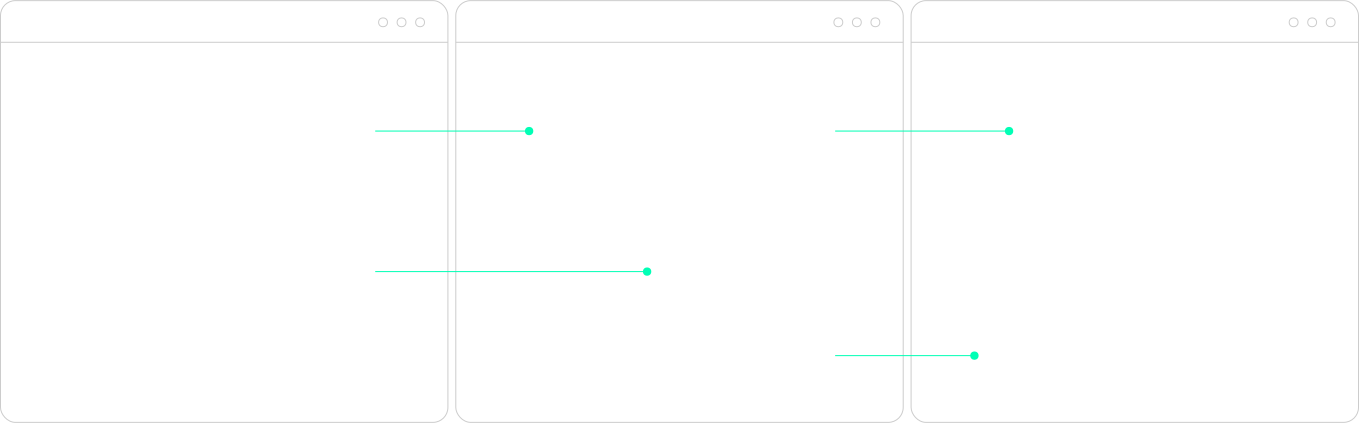

Traditional CMS vs Headless Website

Traditional CMS
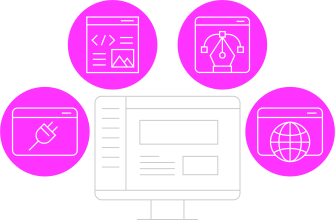
- Content
- Design & layout
- Front-end rendering
- Plugins
Headless Website
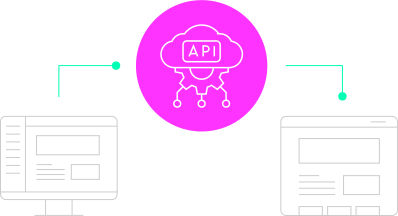
CMS
Create, edit and organise content
API
Delivers content
Front-end
Displays pages, layouts and interactions
Feature
Setup
Quick to launch
Requires more planning
Performance
Dependent on themes and plugins
Optimized front end and edge delivery
Flexibility
Can be limited by CMS
Fully customizable
UX
Can be limited by CMS template engine
Fully customizable
Content Management
Tied to page layouts (theme dependent)
Reusable components based on design system
Scalability
Can hit limits, accrue plugins and overrides over time
Built to scale out of the box
Security
More vulnerable with monolithic architecture and plugin dependent
Reduced attack surface area and API based
Maintenance
Ongoing updates, high volumes of unvetted 3rd party plugin dependencies
Fewer vetted plugins and less maintenance
Cost
Lower upfront build costs, higher on going hosting/maintenance costs
Higher upfront build costs, lower hosting/maintenance costs
| Traditional CMS | Feature | Headless Website |
|---|---|---|
| Quick to launch | Setup | Requires more planning |
| Dependent on themes and plugins | Performance | Optimized front end and edge delivery |
| Can be limited by CMS | Flexibility | Fully customizable |
| Can be limited by CMS template engine | UX | Fully customizable |
| Tied to page layouts (theme dependent) | Content Management | Reusable components based on design system |
| Can hit limits, accrue plugins and overrides over time | Scalability | Built to scale out of the box |
| More vulnerable with monolithic architecture and plugin dependent | Security | Reduced attack surface area and API based |
| Ongoing updates, high volumes of unvetted 3rd party plugin dependencies | Maintenance | Fewer vetted plugins and less maintenance |
| Lower upfront build costs, higher on going hosting/maintenance costs | Cost | Higher upfront build costs, lower hosting/maintenance costs |
Understanding the difference
To define what a headless website is we need to understand what a non-headless website is. (headed? Headered? un-headless?) A traditional CMS is often described as monolithic. Content management and presentation are tightly coupled. The same system stores your content and decides how it appears to users. This structure brings convenience early on but also creates limitations as requirements evolve.
Most websites begin with a straightforward setup where a CMS like WordPress handles content, layout, and rendering in one place. Themes shape the design, plugins extend functionality. For many teams, that’s more than enough to get a site live and working.
Over time, the cracks start to show. The functionality you look to incorporate isn’t natively supported so you throw a few more plugins at it. But then content updates start taking longer than expected. Performance plateaus after launch and then quickly and continually tanks. Design ideas are written off by a constrained system that’s meant to support them. Small changes start to have a cascading effect across the site and suddenly every change carries more risk then it used to.
Headless architecture tends to enter the conversation at that point as an alternative solution to reaching limitations.
With a headless website content is still created and stored in a CMS like Storyblok, which focuses on structured content and editorial workflows. Front-end frameworks such as Next.js take care of how that content is experienced. The difference is that content is delivered through APIs rather than rendered directly. The front-end becomes its own application, responsible for layout, interaction, and performance.
The front-end
The front-end is how your web browser renders the website layout, pages and navigation while controlling the overall design and user experience. It helps to optimize the performance (i.e. page load speed, responsiveness etc) and fetches content from the CMS via API to display it. Front-ends are typically built with frameworks like Next.js which is built on top of React for fast, production-ready websites and apps.
How Headless Works
A headless CMS stores structured content. The front-end fetches that content through an API and turns it into fast, flexible pages.
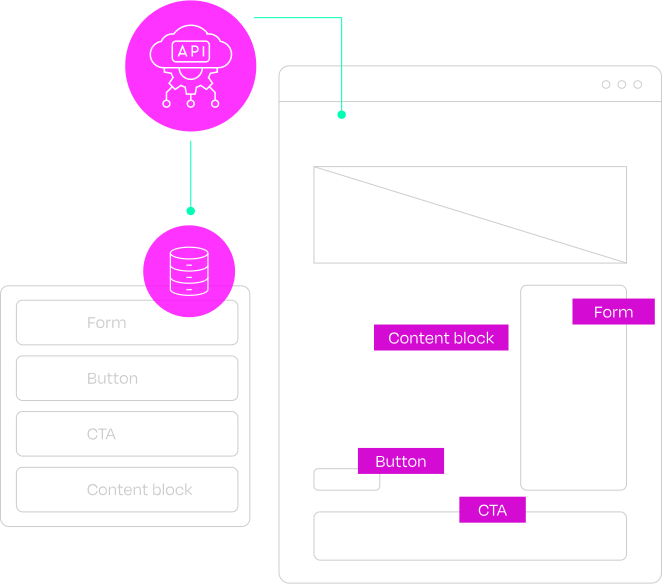
Components: The Building Blocks
Buttons, cards, forms and content blocks can be designed once, then reused across the site. Marketing teams can build new pages faster, while the brand stays consistent.
Components
Components make up the design system that are the building blocks of the front-end. Reusable pieces like buttons, cards, and forms that keep everything consistent without rebuilding each page from scratch. Instead of designing page by page, you’re assembling from a defined set of elements, which keeps the UI tight, cohesive, and on-brand.
With a traditional CMS like WordPress, the front-end and the content are tightly coupled inside the theme. Your design lives in PHP templates that are both rendering the page and pulling the content, so there's no clean separation between the two. With a headless setup and a Next.js front-end, your components live entirely outside the CMS, giving you a proper design system where every button, card, and form is a single source of truth.
For marketing teams, this removes the pressure to “play designer.” You can build new pages quickly using pre-built components that already handle layout, spacing, and styling based on your brand’s design system. This lowers the barrier to entry for what marketing teams can do themselves, but maintains guardrails to ensure everything remains consistent and on brand.
For developers, components mean faster builds, easier maintenance, better scalability and improved collaboration with their marketing counterparts. Update a component once and it updates everywhere, reducing duplication and keeping the system clean.
The back-end
The back-end is your warehouse where the CMS acts as the content engine. Content is created, stored, structured and organized and then fetched by the front-end via API. Some Headless back-ends, like Storyblok, offer easy to use visual editors for non-developers to add, edit and publish content.
There’s still a relationship between the two. Content models influence what can be designed and those design decisions shape how content is structured. The difference lies in how loosely those pieces are connected.
Security
Many traditional CMS setups rely on a large number of plugins, and sometimes they’re well supported by a knowledgeable team, but sometimes they've been built and abandoned years ago by some guy in a basement. Each plugin introduces functionality the CMS doesn’t natively support but they also add complexity and potential risk. Vulnerabilities in popular plugins have been a common entry point for attacks, particularly in the WordPress ecosystem.
Headless sites reduce the amount of surface area that could be exploited in these kinds of attacks. Separating the front-end from the CMS limits direct exposure. The public-facing layer can be statically generated or dynamically rendered through secure APIs, while the CMS operates behind controlled access points.
This doesn’t eliminate risk entirely, but it changes where that risk sits and how it can be managed.
Stability
In traditional coupled systems, updates can have unintended and cascading effects. A plugin update may conflict with another dependency or a theme change might affect unrelated sections of the site. Diagnosing issues often involves tracing interactions between multiple layers.
Headless introduces clearer boundaries with the front-end and back-end operating independently. Issues can be isolated more easily while updates can be applied with less risk of affecting unrelated functionality.
Scalability
As traffic increases or new features are introduced, traditional setups can bend (and ultimately crack) under that pressure and require more work to maintain and operate.
Headless architectures are meant to be scaled:
Content can be cached and distributed globally
New features can be added without restructuring the entire site
Multi-site and multi-region setups can be managed more cleanly
Why Teams Move to Headless
When the old setup starts holding you back
 Slow content updates
- Plugin bloat
- Performance issues
- Template limitations
- Risky site changes
- Multi-site or localisation needs
Why teams move to headless
Headless tends to appeal when a site needs to do more than it was originally built for. Growth, new channels, or more ambitious design often expose the limitations of a tightly coupled traditional website. There are also many reasons teams choose headless out of the box based on the many benefits this architecture offers:
Performance
Modern front-ends built with Next.js are deployed on edge networks like Vercel or Netlify. This allows content to be served physically closer to the end-user, reducing latency. With static site generation, pages can also be pre-built at deploy time and served as highly optimized static assets, further improving load speed and reliability.
Google’s Core Web Vitals highlight how loading speed, interactivity, and visual stability contribute to user experience and search visibility. Improvements in those areas can support engagement and retention when implemented well.
Choosing a headless setup doesn’t inherently guarantee performance gains but it does make them more achievable by giving developers direct control over how pages are built and delivered. The same is true of SEO, the architecture creates more control, but the implementation determines the result.
Flexibility
Traditional CMSs tend to tie decisions together. Making one change can cause a ripple effect that affects other unrelated areas of the website. Headless websites combat that through their separated setup.
A CMS can be replaced without rebuilding the front-end and new integrations can be introduced without reworking the entire system. Teams can evolve their stack over time and at their own pace as needed, rather than committing to a single solution long-term.
This approach aligns with how modern software is built. Smaller, focused tools working together through integrations instead of one system doing everything.
User Experience
The opinionated templates that traditional websites use provide structure, but they also set boundaries.The CMS has no sway over the front-end, which displays data from the CMS however it's designed to do so. Headless sites remove those boundaries at the presentation layer.
Designs are started in tools like Figma and built out into a comprehensive system of modular components. Leveraging that single system between design and build allows for more consistency and more control over interaction.
Instead of adapting ideas to fit within the limitations of a theme, the interface is fully customized around the intended experience.
Who should consider going headless
Headless isn’t a universal solution, it has its strengths and weaknesses like any other platform or tool. It tends to be most effective for teams facing specific challenges.
Who Should Consider Headless?
Creativeteams
Need custom builds that match ambitious designs.

Marketingteams
Need campaign flexibility, localisation tools, and fast performance.
Establishedsite owners
Need to free themselves from theme limitations and plugin upkeep.
Agencies and creative teams
Creative teams often encounter limitations when translating design into build. Template constraints can affect envisioned layouts and may require workarounds or compromises. Delivering consistent designs across projects becomes difficult and time consuming as they need to be rebuilt one by one. Headless supports a more flexible approach without the traditional CMS limitations.
Component-based design systems can eliminate the consistency issues and provide efficiency when building out new projects. This creates a more direct path from concept to implementation.
Forward thinking teams preparing to integrate emerging tools like AI, may require a more modern tech stack then what some traditional CMSs can support. Fully custom front-ends with modern frameworks allow for more precise control over interactions and performance.
Marketing teams
Marketers are often faced with shifting priorities and campaign opportunities that need to be spun up quickly. Updating landing pages, and adapting content for different regions can be slowed down by rigid CMS structures and doesn’t always align with traditional development cycles.
Headless introduces more autonomy with reusable components that allow for faster page creation. Visual editing tools within platforms like Storyblok allow marketing teams to jump right in and build, without waiting for dev support. Built-in localisation and personalisation features support expansion into new markets without duplicating effort.
Established site owners
Many organisations rely on sites that have evolved over time. Plugins accumulate while performance declines. Maintenance and monitoring for security implications becomes a regular task required to keep the lights on while improvements are often delayed because of the effort required to implement them.
Headless offers an alternative foundation that reduces the need for ongoing CMS and plugin maintenance, reduces the attack surface for security exploits by decoupling the front-end and supports future scalability. A migration or rebuild introduces a cleaner structure with fewer dependencies and the system is better positioned to support future changes without requiring another full rebuild.
This is particularly relevant for teams without in-house development support who need a more stable foundation that can be managed more directly.
The Main Benefits

Performance
Modern front-ends can be built for faster loading and better Core Web Vitals.
Flexibility
Change your tech stack without rebuilding everything.

User Experience
Designs are built around the experience, not limited by themes.

Security
Separating the public site from the CMS can reduce exposed attack surface.
Stability
Clearer boundaries make problems easier to isolate.

Scalability
Content, features and regions are built from the on-set to scale.
Final thoughts
Headless websites offer many benefits and use cases to solve specific limitations within traditional CMSs. Content and presentation operate independently, tools are selected for specific uses and systems are built on a foundation that’s meant to adapt over time, rather than remain fixed.
For some teams, that level of flexibility isn’t necessary. For others, it removes constraints that have long remained obstacles. The decision tends to become clearer once those constraints are visible.
The real question isn’t whether headless is better; it’s whether it’s the right fit for how you work and where you’re heading. Hekla can help your team determine whether headless is the right fit for you, before you commit to it.
Headless isn't automatically better.
It's better when it fits.
Hekla can help you decide whether headless is the right fit before you commit to a rebuild.
speak to us about going headless


Co-Founder and Director of Strategy
Colin Eldridge is co-founder of Hekla and a creative strategist focused on digital strategy, content production and website planning. Before moving into digital work he started in radio and audio engineering, an origin story that still shapes his love of storytelling, live music photography and audience-first thinking.
Explore our headless website infographic and see how headless can give your team more freedom to design, publish and grow.